Adventures in FreeBSD Bringup on an RK3588 (Part 1)
Last month while sitting in a cafe, my friend Andrew showed me an article about a quirky new E Ink device that was launching (we're both huge fans of the technology). It was cheap enough to be impulse purchase material, so I went to order it. And on the checkout page, something happened which has literally never happened to me... ever... I saw a "you might also like" style sales pitch, and the product was actually so compelling that I bought it 😱 The company was basically nerd sniping me.
The item in question is a Rockchip 3588 (RK3588) mini PC from Seeed Studio. I was excited because it's rare to see an ARM-based system with a bit of oomph which isn't locked down like Fort Knox. I've long believed (since the early days of the iPhone) that ARM systems have an extremely attractive power to watt ratio. And while platforms like Apple Silicon run circles around the competition, it seems like Apple is the only company that even cares in the consumer PC space these days. There are a few datacenter-class chips that are starting to become widely available, but the entry price isn't exactly cheap, and they are relatively difficult to obtain.
Asd so I become aware of this RK3588 system. The RK3588 has 8 cores (4x A76 and 4x A55). The cores aren't blazing fast but they aren't slow either, and it's configurable with respectable amounts of DDR5. It even comes with 2x 2.5GbE NICs (very handy!) and an NPU (maybe useful; maybe not). And you can buy it with delivery in a month for what I considered to be a fair price.
Schematics included!
Wait, schematics? Yeh, so there's this other thing... I'd really prefer to run FreeBSD on it (or maybe NetBSD now that they have cells?). And for that, I'll probably need some schematics and other documentation.
How hard can it be? I guess that's what we'll find out in this series. Here's the first post.
Getting some help from Armbian
The first thing I learned is that most ARM SBCs don't actually have a BIOS or UEFI or anything in firmware.
There's no boot menu to say "why yes, I'd like the USB stick, please."
Instead, you usually boot off of SD, eMMC, or SPI flash (I did not even know what this was to be honest).
If you're familiar with the idea of burning an ISO to a CDR or flashing an image to a USB stick with dd,
the process for these devices is similar.
But in addition to the OS, you also need a bootloader, and these are often chip- or board-specific.
The Seeed studio reComputer has official Armbian support. So my first idea was to pull the boot images from the Armbian distro that I'd already installed and write that to the relevant early sectors of the card, on top of a FreeBSD system image designed for a similar chipset. The FreeBSD project publishes official images for a few device families, including RockPro, which is a reasonable starting point.
I first used the Armbian Installer to create a bootable SD card from my other computer
(a MacBook in this case) which has an SD card reader.
At the time of this writing, the version was v26.8.5 for reComputer RK3588 running Armbian Linux 6.1.172-vendor-seeed-rk3588.
(NB: I set up an SSH host config with recomputer as an alias to make things easier.)
mkdir ~/recomputer-rk3588-boot

scp recomputer:/usr/lib/linux-u-boot-vendor-recomputer-rk3588-devkit/idbloader.img ~/recomputer-rk3588-boot/
scp recomputer:/usr/lib/linux-u-boot-vendor-recomputer-rk3588-devkit/u-boot.itb ~/recomputer-rk3588-boot/
scp recomputer:/boot/dtb-6.1.172-vendor-seeed-rk3588/rockchip/rk3588-recomputer-rk3588-devkit.dtb ~/recomputer-rk3588-boot/
The next thing I did was to prepare for the eventuality of not having a regular video connection like with the older systems I was used to. Given that FreeBSD doesn't fully support the RK3588 yet, we'll need to set up a serial UART connection as HDMI probably won't work on the first boot.
To do this, we need to figure out the baud rate.
Armbian, which works out of the box, can help us.
Poking around /boot, I found the DTB (Device Tree Blob).
This file describes the hardware of the system.
We can convert the blob back to source like this:
dtc -I dtb -O dts \
  /boot/dtp-6.1.172-vendor-seeed-rk3588/rockchip/rk3588-recomputer-rk3588-devkit.dtb \
  > /tmp/recomputer.dts
I was able to discover that the UART console is on fiq-debugger,
so I poked around for that block in the DTS.
I found the line rockchip,baudrate = <0x16e360>, which translates into 1500000 in decimal.
So there's our baudrate.
Getting our first console
As mentioned above, the board firmware is barebones, so we can't take HDMI or anything for granted. ARM SBCs like this give us GPIO headers instead.
GPIO headers are just raw pins that you wire up with cables to... something you can work with.
For most people, that "something you can work with" is a USB to TTL adapter.
It has has USB connector on one side, maybe a jumper for voltage configuration, and 4 pins (VCC, TX, RX, and GND),
and we can use it with tools like cu to get a console
(which is incidentally WAY nicer once set up than most standard monitor setups!).
I purchased a cheap adapter off Coupang. Actually, I purchased TWO adapters, since I mistakenly ordered a 5V one the first time, and realized my mistake looking at the schematic (this board needs 3.3V).
The 40-pin GPIO header is next to the CPU, but there are no labels. While Seeed Studio does publish full schematics, I couldn't find any indication on the top side of the board which pins were which.
After a few minutes of scrutinizing for microscopic markings, I flipped the board over and found they had helpfully marked GND, RX, and TX pins on the underside!
The cables were VERY short so it took a bit of desk tetris to get things oriented.
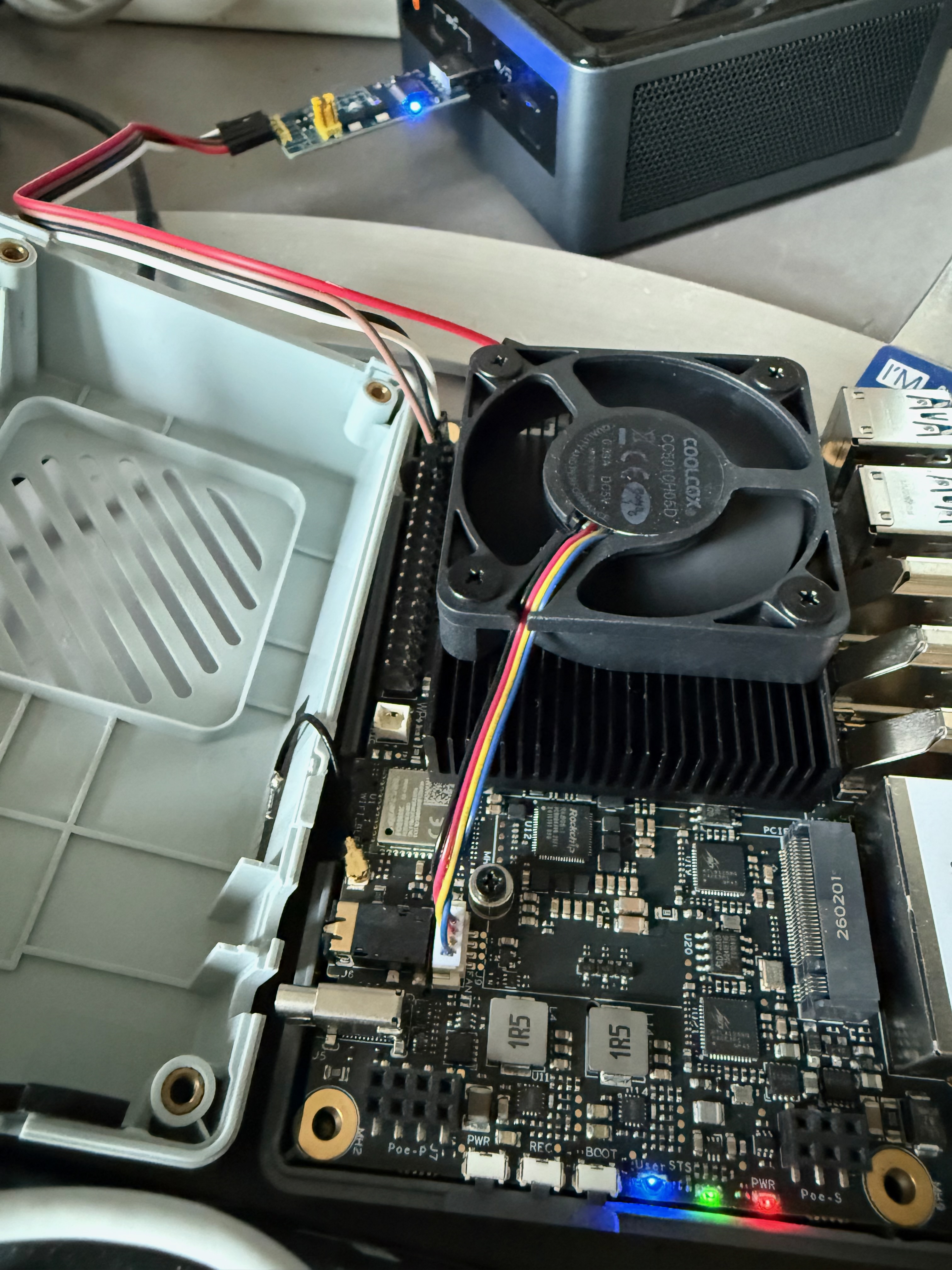
FreeBSD recognized the USB device as a serial console at /dev/cuaU0 on my machine.
So now with the baud rate, we have all we need to open up the connection: cu -l /dev/cuaU0 -s 1500000
(NB: you need to run this as root).
Powering on the device, I got the following output from an Armbian boot. Success: we have a console!
DDR b8ce94f14b cym 25/09/26-15:48.05,fwver: v1.20
ch0 ttot6
ch1 ttot6
ch2 ttot6
ch3 ttot6
ch0 ttot7
LPDDR5, 2400MHz
channel[0] BW=16 Col=10 Bk=16 CS0 Row=16 CS1 Row=16 CS=2 Die BW=16 Size=4096MB
ch1 ttot7
channel[1] BW=16 Col=10 Bk=16 CS0 Row=16 CS1 Row=16 CS=2 Die BW=16 Size=4096MB
ch2 ttot7
channel[2] BW=16 Col=10 Bk=16 CS0 Row=16 CS1 Row=16 CS=2 Die BW=16 Size=4096MB
ch3 ttot7
channel[3] BW=16 Col=10 Bk=16 CS0 Row=16 CS1 Row=16 CS=2 Die BW=16 Size=4096MB
Manufacturer ID:0xff
DQS rds:l0,l0
CH0 RX Vref:27.1%, TX Vref:22.0%,21.0%
DQ rds:h4 h4 h3 h1 h6 h4 h4 h2, l1 l0 h2 h7 h1 l0 l0 h1

DQS rds:h1,l1
CH1 RX Vref:27.5%, TX Vref:22.0%,21.0%
DQ rds:h2 h1 h7 h5 h2 h4 h6 h4, h5 h3 h3 h3 h1 h2 h4 h1

DQS rds:l0,l0
CH2 RX Vref:27.1%, TX Vref:23.0%,23.0%
DQ rds:h3 h1 h1 h5 h2 h7 h3 h3, h1 h3 h7 h1 h2 l0 h2 h1

DQS rds:l0,l0
CH3 RX Vref:30.1%, TX Vref:22.0%,22.0%
DQ rds:h2 h2 h2 h2 h4 h1 h4 h1, h5 h2 h1 l0 h3 h3 h2 l0

stride=0x2, ddr_config=0x6
hash ch_mask0-1 0x20 0x40, bank_mask0-3 0x0 0x2400 0x44800 0x89000, rank_mask0 0x2000
change to F1: 534MHz
ch0 ttot6
ch1 ttot6
ch2 ttot6
ch3 ttot6
change to F2: 1320MHz
ch0 ttot8
ch1 ttot8
ch2 ttot8
ch3 ttot8
change to F3: 1968MHz
ch0 ttot6
ch1 ttot6
ch2 ttot6
ch3 ttot6
change to F0: 2400MHz
ch0 ttot7
ch1 ttot7
ch2 ttot7
ch3 ttot7
out
U-Boot SPL board init
U-Boot SPL 2017.09_armbian-2017.09-S39cd-P3cf6-H5af5-V6ae2-B6a81-R448a (Sep 16 2026 - 02:12:42)
SPL Hotkey: ctrl+`
sfc cmd=03H(6BH-x4)
Trying to boot from MMC2
MMC: no card present
mmc_init: -123, time 0
spl: mmc init failed with error: -123
Trying to boot from MTD2
Trying fit image at 0x4000 sector
## Verified-boot: 0
## Checking atf-1 0x00040000 ... sha256(7612223b82...) + OK
## Checking uboot 0x00200000 ... sha256(23eb671700...) + OK
## Checking fdt 0x0035b190 ... sha256(3e1835469d...) + OK
## Checking atf-2 0xff100000 ... sha256(70505bb764...) + OK
## Checking atf-3 0x000f0000 ... sha256(b2af21b504...) + OK
Jumping to U-Boot(0x00200000) via ARM Trusted Firmware(0x00040000)
Total: 503.254/895.848 ms

INFO:    Preloader serial: 2
NOTICE:  BL31: v2.3():v2.3-868-g040d2de11:derrick.huang, fwver: v1.48
NOTICE:  BL31: Built : 15:02:44, Dec 19 2024
INFO:    spec: 0x1
INFO:    code: 0x88
INFO:    ext 32k is not valid
INFO:    ddr: stride-en 4CH
INFO:    GICv3 without legacy support detected.
INFO:    ARM GICv3 driver initialized in EL3
INFO:    valid_cpu_msk=0xff bcore0_rst = 0x0, bcore1_rst = 0x0
INFO:    l3 cache partition cfg-0
INFO:    system boots from cpu-hwid-0
INFO:    bypass memory repair
INFO:    idle_st=0x21fff, pd_st=0x11fff9, repair_st=0xfff70001
INFO:    dfs DDR fsp_params[0].freq_mhz= 2400MHz
INFO:    dfs DDR fsp_params[1].freq_mhz= 534MHz
INFO:    dfs DDR fsp_params[2].freq_mhz= 1320MHz
INFO:    dfs DDR fsp_params[3].freq_mhz= 1968MHz
INFO:    BL31: Initialising Exception Handling Framework
INFO:    BL31: Initializing runtime services
WARNING: No OPTEE provided by BL2 boot loader, Booting device without OPTEE initialization. SMC`s destined for OPTEE will return SMC_UNK
ERROR:   Error initializing runtime service opteed_fast
INFO:    BL31: Preparing for EL3 exit to normal world
INFO:    Entry point address = 0x200000
INFO:    SPSR = 0x3c9
usb dr_mode not found
usb dr_mode not found


U-Boot 2017.09_armbian-2017.09-S39cd-P3cf6-H5af5-V6ae2-B6a81-R448a (Sep 16 2026 - 02:12:42 +0000)

Model: Seeed Studio reComputer RK3588 DevKit
MPIDR: 0x0
PreSerial: 2, raw, 0xfeb50000
DRAM:  16 GiB
Sysmem: init
Relocation Offset: eda03000
Relocation fdt: eb7f6e50 - eb7fecc0
CR: M/C/I
usb dr_mode not found
usb dr_mode not found
DM: v2
RESC: No bootdev
Failed to load DTB, ret=-2
No valid DTB, ret=-22
Failed to get kernel dtb, ret=-22
Booted from SPI NOR; scanning OS boot devices
mmc@fe2c0000: 1, mmc@fe2e0000: 0
MMC: no card present
mmc_init: -123, time 0
pcie@fe180000: PCIe Linking... LTSSM is 0x0
pcie@fe180000: PCIe Linking... LTSSM is 0x0
pcie@fe180000: PCIe Linking... LTSSM is 0x2
pcie@fe180000: PCIe Linking... LTSSM is 0x2
pcie@fe180000: PCIe Linking... LTSSM is 0x3
pcie@fe180000: PCIe Linking... LTSSM is 0x3
pcie@fe180000: PCIe Linking... LTSSM is 0x3
pcie@fe180000: PCIe Linking... LTSSM is 0x3
pcie@fe180000: PCIe Linking... LTSSM is 0x3
pcie@fe180000: PCIe Linking... LTSSM is 0x3
pcie@fe180000: PCIe Linking... LTSSM is 0x3
pcie@fe180000: PCIe Linking... LTSSM is 0x3
pcie@fe180000: PCIe Linking... LTSSM is 0x3
pcie@fe180000: PCIe Linking... LTSSM is 0x3
pcie@fe180000: PCIe Linking... LTSSM is 0x3
pcie@fe180000: PCIe Linking... LTSSM is 0x3
pcie@fe180000: PCIe Linking... LTSSM is 0x3
pcie@fe180000: PCIe Linking... LTSSM is 0x3
pcie@fe180000: PCIe Linking... LTSSM is 0x3
pcie@fe180000: PCIe Linking... LTSSM is 0x3
pcie@fe180000: PCIe Linking... LTSSM is 0x3
pcie@fe180000: PCIe Linking... LTSSM is 0x3
pcie@fe180000: PCIe Linking... LTSSM is 0x3
pcie@fe180000: PCIe Linking... LTSSM is 0x3
pcie@fe180000: PCIe Linking... LTSSM is 0x3
pcie@fe180000: PCIe Linking... LTSSM is 0x3
pcie@fe180000: PCIe Linking... LTSSM is 0x3
pcie@fe180000: PCIe Linking... LTSSM is 0x3
pcie@fe180000: PCIe Linking... LTSSM is 0x3
pcie@fe180000: PCIe Linking... LTSSM is 0x3
pcie@fe180000: PCIe Linking... LTSSM is 0x3
pcie@fe180000: PCIe Linking... LTSSM is 0x3
pcie@fe180000: PCIe Linking... LTSSM is 0x3
pcie@fe180000: PCIe Linking... LTSSM is 0x3
pcie@fe180000: PCIe Linking... LTSSM is 0x3
pcie@fe180000: PCIe Linking... LTSSM is 0x3
pcie@fe180000: PCIe Linking... LTSSM is 0x3
pcie@fe180000: PCIe Linking... LTSSM is 0x3
pcie@fe180000: PCIe Linking... LTSSM is 0x3
pcie@fe180000: PCIe Linking... LTSSM is 0x3
pcie@fe180000: PCIe Linking... LTSSM is 0x3
pcie@fe180000: PCIe Linking... LTSSM is 0x3
pcie@fe180000: PCIe Linking... LTSSM is 0x3
pcie@fe180000: PCIe Linking... LTSSM is 0x3
pcie@fe180000: PCIe Linking... LTSSM is 0x3
pcie@fe180000: PCIe Linking... LTSSM is 0x3
pcie@fe180000: PCIe Linking... LTSSM is 0x3
pcie@fe180000: PCIe Linking... LTSSM is 0x3
pcie@fe180000: PCIe Linking... LTSSM is 0x3
pcie@fe180000: PCIe Linking... LTSSM is 0x3
pcie@fe180000: PCIe-0 Link Fail
pcie@fe190000: PCIe Linking... LTSSM is 0x0
pcie@fe190000: PCIe Link up, LTSSM is 0x130011
pcie@fe190000: PCIE-0: Link up (Gen2-x1, Bus0)
pcie@fe150000: PCIe Linking... LTSSM is 0x1
pcie@fe150000: PCIe Linking... LTSSM is 0x210023
pcie@fe150000: PCIe Link up, LTSSM is 0x230011
pcie@fe150000: PCIE-2: Link up (Gen3-x4, Bus2)
pcie@fe170000: PCIe Linking... LTSSM is 0x0
pcie@fe170000: PCIe Link up, LTSSM is 0x130011
pcie@fe170000: PCIE-4: Link up (Gen2-x1, Bus4)

Device 0: Vendor: 0x1e0f Rev: ECFA17.3 Prod: 65PA20KEKQLP
            Type: Hard Disk
            Capacity: 1907729.0 MB = 1863.0 GB (3907029168 x 512)
... is now current device
Boot from nvme
Bootdev(scan): nvme 0
PartType: EFI
*** Warning - bad CRC, using default environment

Model: Seeed Studio reComputer RK3588 DevKit
[Vendor ERROR]:Invalid boot device type(0)
## Error: Can't overwrite "ethaddr"
## Error inserting "ethaddr" variable, errno=1
## Error: Can't overwrite "eth1addr"
## Error inserting "eth1addr" variable, errno=1
[Vendor ERROR]:Invalid boot device type(0)
rockchip_set_ethaddr: vendor_storage_write failed -19
[Vendor ERROR]:Invalid boot device type(0)
Booted from SPI NOR; scanning OS boot devices
MMC: no card present
mmc_init: -123, time 0
pcie@fe180000: PCIe Linking... LTSSM is 0x0
pcie@fe180000: PCIe Linking... LTSSM is 0x0
pcie@fe180000: PCIe Linking... LTSSM is 0x2
pcie@fe180000: PCIe Linking... LTSSM is 0x2
pcie@fe180000: PCIe Linking... LTSSM is 0x3
pcie@fe180000: PCIe Linking... LTSSM is 0x3
pcie@fe180000: PCIe Linking... LTSSM is 0x3
pcie@fe180000: PCIe Linking... LTSSM is 0x3
pcie@fe180000: PCIe Linking... LTSSM is 0x3
pcie@fe180000: PCIe Linking... LTSSM is 0x3
pcie@fe180000: PCIe Linking... LTSSM is 0x3
pcie@fe180000: PCIe Linking... LTSSM is 0x3
pcie@fe180000: PCIe Linking... LTSSM is 0x3
pcie@fe180000: PCIe Linking... LTSSM is 0x3
pcie@fe180000: PCIe Linking... LTSSM is 0x3
pcie@fe180000: PCIe Linking... LTSSM is 0x3
pcie@fe180000: PCIe Linking... LTSSM is 0x3
pcie@fe180000: PCIe Linking... LTSSM is 0x3
pcie@fe180000: PCIe Linking... LTSSM is 0x3
pcie@fe180000: PCIe Linking... LTSSM is 0x3
pcie@fe180000: PCIe Linking... LTSSM is 0x3
pcie@fe180000: PCIe Linking... LTSSM is 0x3
pcie@fe180000: PCIe Linking... LTSSM is 0x3
pcie@fe180000: PCIe Linking... LTSSM is 0x3
pcie@fe180000: PCIe Linking... LTSSM is 0x3
pcie@fe180000: PCIe Linking... LTSSM is 0x3
pcie@fe180000: PCIe Linking... LTSSM is 0x3
pcie@fe180000: PCIe Linking... LTSSM is 0x3
pcie@fe180000: PCIe Linking... LTSSM is 0x3
pcie@fe180000: PCIe Linking... LTSSM is 0x3
pcie@fe180000: PCIe Linking... LTSSM is 0x3
pcie@fe180000: PCIe Linking... LTSSM is 0x3
pcie@fe180000: PCIe Linking... LTSSM is 0x3
pcie@fe180000: PCIe Linking... LTSSM is 0x3
pcie@fe180000: PCIe Linking... LTSSM is 0x3
pcie@fe180000: PCIe Linking... LTSSM is 0x3
pcie@fe180000: PCIe Linking... LTSSM is 0x3
pcie@fe180000: PCIe Linking... LTSSM is 0x3
pcie@fe180000: PCIe Linking... LTSSM is 0x3
pcie@fe180000: PCIe Linking... LTSSM is 0x3
pcie@fe180000: PCIe Linking... LTSSM is 0x3
pcie@fe180000: PCIe Linking... LTSSM is 0x3
pcie@fe180000: PCIe Linking... LTSSM is 0x3
pcie@fe180000: PCIe Linking... LTSSM is 0x3
pcie@fe180000: PCIe Linking... LTSSM is 0x3
pcie@fe180000: PCIe Linking... LTSSM is 0x3
pcie@fe180000: PCIe Linking... LTSSM is 0x3
pcie@fe180000: PCIe Linking... LTSSM is 0x3
pcie@fe180000: PCIe Linking... LTSSM is 0x3
pcie@fe180000: PCIe Linking... LTSSM is 0x3
pcie@fe180000: PCIe-6 Link Fail

Device 0: Vendor: 0x1e0f Rev: ECFA17.3 Prod: 65PA20KEKQLP
            Type: Hard Disk
            Capacity: 1907729.0 MB = 1863.0 GB (3907029168 x 512)
... is now current device
Boot from nvme
Bootdev(scan): nvme 0
starting USB...
Bus usb@fc000000: usb maximum-speed not found
Register 2000140 NbrPorts 2
Starting the controller
USB XHCI 1.10
Bus usb@fc800000: USB EHCI 1.00
Bus usb@fc840000: USB OHCI 1.0
Bus usb@fc880000: USB EHCI 1.00
Bus usb@fc8c0000: USB OHCI 1.0
Bus usb@fc400000: usb maximum-speed not found
Register 2000140 NbrPorts 2
Starting the controller
USB XHCI 1.10
scanning bus usb@fc000000 for devices... 1 USB Device(s) found
scanning bus usb@fc800000 for devices... 1 USB Device(s) found
scanning bus usb@fc840000 for devices... 1 USB Device(s) found
scanning bus usb@fc880000 for devices... 1 USB Device(s) found
scanning bus usb@fc8c0000 for devices... 1 USB Device(s) found
scanning bus usb@fc400000 for devices... cannot reset port 1!?
1 USB Device(s) found
       scanning usb for storage devices... 0 Storage Device(s) found
No usb mass storage found
No bootdev
dev_desc is NULL!
boot mode: None
No bootdev
CLK: (sync kernel. arm: enter 1008000 KHz, init 1008000 KHz, kernel 0N/A)
  b0pll 24000 KHz
  b1pll 24000 KHz
  lpll 24000 KHz
  v0pll 24000 KHz
  aupll 24000 KHz
  cpll 1500000 KHz
  gpll 1188000 KHz
  npll 24000 KHz
  ppll 1100000 KHz
  aclk_center_root 702000 KHz
  pclk_center_root 100000 KHz
  hclk_center_root 396000 KHz
  aclk_center_low_root 500000 KHz
  aclk_top_root 750000 KHz
  pclk_top_root 100000 KHz
  aclk_low_top_root 396000 KHz
No bootdev
Net:   No ethernet found.
Hit key to stop autoboot('CTRL+C'):  0

Device 0: unknown device
MMC: no card present
mmc_init: -123, time 0
pcie@fe180000: PCIe Linking... LTSSM is 0x0
pcie@fe180000: PCIe Linking... LTSSM is 0x0
pcie@fe180000: PCIe Linking... LTSSM is 0x2
pcie@fe180000: PCIe Linking... LTSSM is 0x2
pcie@fe180000: PCIe Linking... LTSSM is 0x3
pcie@fe180000: PCIe Linking... LTSSM is 0x3
pcie@fe180000: PCIe Linking... LTSSM is 0x3
pcie@fe180000: PCIe Linking... LTSSM is 0x3
pcie@fe180000: PCIe Linking... LTSSM is 0x3
pcie@fe180000: PCIe Linking... LTSSM is 0x3
pcie@fe180000: PCIe Linking... LTSSM is 0x3
pcie@fe180000: PCIe Linking... LTSSM is 0x3
pcie@fe180000: PCIe Linking... LTSSM is 0x3
pcie@fe180000: PCIe Linking... LTSSM is 0x3
pcie@fe180000: PCIe Linking... LTSSM is 0x3
pcie@fe180000: PCIe Linking... LTSSM is 0x3
pcie@fe180000: PCIe Linking... LTSSM is 0x3
pcie@fe180000: PCIe Linking... LTSSM is 0x3
pcie@fe180000: PCIe Linking... LTSSM is 0x3
pcie@fe180000: PCIe Linking... LTSSM is 0x3
pcie@fe180000: PCIe Linking... LTSSM is 0x3
pcie@fe180000: PCIe Linking... LTSSM is 0x3
pcie@fe180000: PCIe Linking... LTSSM is 0x3
pcie@fe180000: PCIe Linking... LTSSM is 0x3
pcie@fe180000: PCIe Linking... LTSSM is 0x3
pcie@fe180000: PCIe Linking... LTSSM is 0x3
pcie@fe180000: PCIe Linking... LTSSM is 0x3
pcie@fe180000: PCIe Linking... LTSSM is 0x3
pcie@fe180000: PCIe Linking... LTSSM is 0x3
pcie@fe180000: PCIe Linking... LTSSM is 0x3
pcie@fe180000: PCIe Linking... LTSSM is 0x3
pcie@fe180000: PCIe Linking... LTSSM is 0x3
pcie@fe180000: PCIe Linking... LTSSM is 0x3
pcie@fe180000: PCIe Linking... LTSSM is 0x3
pcie@fe180000: PCIe Linking... LTSSM is 0x3
pcie@fe180000: PCIe Linking... LTSSM is 0x3
pcie@fe180000: PCIe Linking... LTSSM is 0x3
pcie@fe180000: PCIe Linking... LTSSM is 0x3
pcie@fe180000: PCIe Linking... LTSSM is 0x3
pcie@fe180000: PCIe Linking... LTSSM is 0x3
pcie@fe180000: PCIe Linking... LTSSM is 0x3
pcie@fe180000: PCIe Linking... LTSSM is 0x3
pcie@fe180000: PCIe Linking... LTSSM is 0x3
pcie@fe180000: PCIe Linking... LTSSM is 0x3
pcie@fe180000: PCIe Linking... LTSSM is 0x3
pcie@fe180000: PCIe Linking... LTSSM is 0x3
pcie@fe180000: PCIe Linking... LTSSM is 0x3
pcie@fe180000: PCIe Linking... LTSSM is 0x3
pcie@fe180000: PCIe Linking... LTSSM is 0x3
pcie@fe180000: PCIe Linking... LTSSM is 0x3
pcie@fe180000: PCIe-6 Link Fail

Device 0: Vendor: 0x1e0f Rev: ECFA17.3 Prod: 65PA20KEKQLP
            Type: Hard Disk
            Capacity: 1907729.0 MB = 1863.0 GB (3907029168 x 512)
... is now current device
Could not find misc partition
ANDROID: reboot reason: "(none)"
Not AVB images, AVB skip
android_image_load_by_partname: Can't find part: boot
Android image load failed
Android boot failed, error -1.
Scanning nvme 0:1...
Found U-Boot script /boot/boot.scr
8646 bytes read in 2 ms (4.1 MiB/s)
## Executing script at 00500000
Boot script loaded from nvme 0:1
243 bytes read in 2 ms (118.2 KiB/s)
300175 bytes read in 9 ms (31.8 MiB/s)
Unknown command ':' - try 'help'
Setting bus to 4
I2c4 speed: 100000Hz
Detected board: reComputer RK3588 Devkit, using DTB: rockchip/rk3588-recomputer-rk3588-devkit.dtb
Using fdtfile=rockchip/rk3588-recomputer-rk3588-devkit.dtb
16437252 bytes read in 21 ms (746.5 MiB/s)
45464064 bytes read in 52 ms (833.8 MiB/s)
300175 bytes read in 9 ms (31.8 MiB/s)
** File not found /boot/dtb/rockchip/overlay/seeed-rk3588-rockchip-rk3588-panthor-gpu.dtbo **
441 bytes read in 14 ms (30.3 KiB/s)
Applying kernel provided DT overlay rockchip-rk3588-panthor-gpu.dtbo
Trying kaslrseed command... Info: Unknown command can be safely ignored since kaslrseed does not apply to all boards.
Unknown command 'kaslrseed' - try 'help'
Fdt Ramdisk skip relocation
No misc partition
## Loading init Ramdisk from Legacy Image at 0a200000 ...
   Image Name:   uInitrd
   Image Type:   AArch64 Linux RAMDisk Image (gzip compressed)
   Data Size:    16437188 Bytes = 15.7 MiB
   Load Address: 00000000
   Entry Point:  00000000
   Verifying Checksum ... OK
## Flattened Device Tree blob at 0x08300000
   Booting using the fdt blob at 0x08300000
   reserving fdt memory region: addr=8300000 size=af000
   Using Device Tree in place at 0000000008300000, end 00000000083b1fff
JEDEC id bytes: 5e, 40, 18
SF: Detected sfc_nor with page size 256 Bytes, erase size 4 KiB, total 16 MiB
## reserved-memory:
  cma: addr=10000000 size=10000000
  ramoops@110000: addr=110000 size=e0000
Adding bank: 0x00200000 - 0xf0000000 (size: 0xefe00000)
Adding bank: 0x100000000 - 0x3fc000000 (size: 0x2fc000000)
Adding bank: 0x3fc500000 - 0x3fff00000 (size: 0x03a00000)
Adding bank: 0x4f0000000 - 0x500000000 (size: 0x10000000)
Total: 14284.180/14297.174 ms

Starting kernel ...


Armbian 26.8.5 Trixie ttyFIQ0

recomputer-rk3588-devkit login:
Flashing an SD card
Okay, now we can finally flash an SD card.
The FreeBSD images have a similar layout to the Armbian ones,
so theoretically we can just overwrite the boot area with U-Boot
using a version that's already been patched for this exact board by Armbian and the vendor.
I downloaded the latest current image,
flashed it, and then overwrote the bootloader we lifted from Armbian.
NB: I use nushell but this shuld be easy to adopt to another shell.
# Look at availabe disks
diskutil list
# Find the SD card and note its disk number; for me it's disk4
diskutil unmountDisk /dev/disk4 # Probably not necessary, but just in case...
# rdisk devs are faster on macOS; the block size is 1 megabyte but in a portable representation
sudo dd if=FreeBSD-16.0-CURRENT-arm64-aarch64-ROCKPRO64-20260916-32878e64e687-289242.img of=/dev/rdisk4 bs=1048576
let BOOT = $ "( $ env .HOME)/recomputer-rk3588-boot"
sudo dd if=$ "( $ BOOT )/idbloader.img" of=/dev/rdisk4 bs=512 seek=64 conv=notrunc
sudo dd if=$ "( $ BOOT )/u-boot.itb" of=/dev/rdisk4 bs=512 seek=16384 conv=notrunc
sync Skipping the boring parts, this fails.
It seems like the vendor version of U-Boot (2017.09, but built on August 31, 2026... interesting...) doesn't have UEFI support.
However, the newer Armbian mainline U-boot packages do!
To get this, we need to turn to the edge branch.
An internet search turned up apt-test.next.armbian.com,
which had an edge variant deb package for download.
I grabbed that and then extracted just the pieces to flash on the SD card.
NOTE: These commands will not work exactly as it's a datestamped package.
wget https://apt-test.next.armbian.com/pool/main/l/linux-u-boot-recomputer-rk3588-devkit-edge/linux-u-boot-recomputer-rk3588-devkit-edge_26.09.23-1999_arm64.deb
mkdir /tmp/recomputer-edge-uboot
dpkg-deb -x linux-u-boot-recomputer-rk3588-devkit-edge_*.deb /tmp/recomputer-edge-uboot
In there, I found what I was looking for: /tmp/recomputer-edge-uboot/usr/lib/linux-u-boot-edge-recomputer-rk3588-devkit/u-boot-rockchip.bin.
This actually does the duty of both the separate images we had to line up before.
Note how the first idbloader.img was offset by 32K (512 x 64).
shell
sudo dd if=$ "( $ env .HOME)/recomputer-rk3588-boot/u-boot-rockchip.bin" of=/dev/rdisk4 bs=32768 seek=1 conv=notrunc
sync Then it's off to boot. And this looks something much more like a first boot... ish! Here's the first part of the boot sequence.
DDR b8ce94f14b cym 25/09/26-15:48.05,fwver: v1.20
ch0 ttot6
ch1 ttot6
ch2 ttot6
ch3 ttot6
ch0 ttot7
LPDDR5, 2400MHz
channel[0] BW=16 Col=10 Bk=16 CS0 Row=16 CS1 Row=16 CS=2 Die BW=16 Size=4096MB
ch1 ttot7
channel[1] BW=16 Col=10 Bk=16 CS0 Row=16 CS1 Row=16 CS=2 Die BW=16 Size=4096MB
ch2 ttot7
channel[2] BW=16 Col=10 Bk=16 CS0 Row=16 CS1 Row=16 CS=2 Die BW=16 Size=4096MB
ch3 ttot7
channel[3] BW=16 Col=10 Bk=16 CS0 Row=16 CS1 Row=16 CS=2 Die BW=16 Size=4096MB
Manufacturer ID:0xff
DQS rds:l0,l0
CH0 RX Vref:27.1%, TX Vref:22.0%,20.0%
DQ rds:h4 h4 h3 h1 h6 h3 h4 h2, l1 l0 h2 h7 h2 l0 l0 h1

DQS rds:h1,l1
CH1 RX Vref:27.5%, TX Vref:21.0%,21.0%
DQ rds:h2 h1 h7 h5 h2 h4 h5 h3, h5 h4 h3 h4 h1 h3 h4 l0

DQS rds:l0,l0
CH2 RX Vref:27.1%, TX Vref:24.0%,22.0%
DQ rds:h3 h1 h1 h6 h2 h7 h3 h3, h1 h3 h7 h1 h2 l0 h2 h1

DQS rds:l0,l0
CH3 RX Vref:30.1%, TX Vref:21.0%,21.0%
DQ rds:h1 h1 h2 h2 h4 h1 h3 h1, h4 h1 h1 l0 h3 h3 h1 l0

stride=0x2, ddr_config=0x6
hash ch_mask0-1 0x20 0x40, bank_mask0-3 0x0 0x2400 0x44800 0x89000, rank_mask0 0x2000
change to F1: 534MHz
ch0 ttot6
ch1 ttot6
ch2 ttot6
ch3 ttot6
change to F2: 1320MHz
ch0 ttot8
ch1 ttot8
ch2 ttot8
ch3 ttot8
change to F3: 1968MHz
ch0 ttot6
ch1 ttot6
ch2 ttot6
ch3 ttot6
change to F0: 2400MHz
ch0 ttot7
ch1 ttot7
ch2 ttot7
ch3 ttot7
out
U-Boot SPL board init
U-Boot SPL 2017.09_armbian-2017.09-S39cd-P3cf6-H5af5-V6ae2-B6a81-R448a (Sep 16 2026 - 02:12:42)
sfc cmd=03H(6BH-x4)
Trying to boot from MMC2
spl: partition error
Trying fit image at 0x4000 sector
## Verified-boot: 0
## Checking atf-1 0x00040000 ... sha256(38af45e591...) + OK
## Checking u-boot 0x00800000 ... sha256(76020c775a...) + OK
## Checking fdt-1 0x00950150 ... sha256(dba4ede5fc...) + OK
## Checking atf-2 0x0005f000 ... sha256(498d3d780d...) + OK
## Checking atf-3 0xff100000 ... sha256(98ca41a3ef...) + OK
Jumping to U-Boot(0x00800000) via ARM Trusted Firmware(0x00040000)
Total: 677.349/1069.752 ms

NOTICE:  BL31: v2.13.0(release):armbian
NOTICE:  BL31: Built : 13:13:21, Sep 23 2026
INFO:    GICv3 without legacy support detected.
INFO:    ARM GICv3 driver initialized in EL3
INFO:    Maximum SPI INTID supported: 511
INFO:    BL31: Initializing runtime services
INFO:    BL31: Preparing for EL3 exit to normal world
INFO:    Entry point address = 0x800000
INFO:    SPSR = 0x3c9


U-Boot 2026.07_armbian-2026.07-Sece3-P1da1-He361-V493b-B6a81-R448a (Sep 23 2026 - 13:13:38 +0000)

Model: Seeed Studio reComputer RK3588 Dev Kit
SoC:   RK3588
DRAM:  16 GiB
PMIC:  RK806 (on=0x80, off=0x80)
Core:  848 devices, 36 uclasses, devicetree: separate
MMC:   mmc@fe2c0000: 1, mmc@fe2e0000: 0
Loading Environment from SPIFlash... SF: Detected zb25vq128 with page size 256 Bytes, erase size 4 KiB, total 16 MiB
*** Warning - bad CRC, using default environment

In:    serial@feb50000
Out:   serial@feb50000
Err:   serial@feb50000
Model: Seeed Studio reComputer RK3588 Dev Kit
SoC:   RK3588
Net:   No ethernet found.
Hit any key to stop autoboot: 0
Scanning for bootflows in all bootdevs
Seq  Method       State   Uclass    Part  Name                      Filename
---  -----------  ------  --------  ----  ------------------------  ----------------
Scanning global bootmeth 'efi_mgr':
Card did not respond to voltage select! : -110
No EFI variables loaded
  0  efi_mgr      ready   (none)       0  <NULL>
** Booting bootflow '<NULL>' with efi_mgr
Booting: Label: mmc 1 Device path: /VenHw(e61d73b9-a384-4acc-aeab-82e828f3628b,0000000000000000)/SD(1)/SD(0)
[image_setup_libfdt] called
[image_setup_libfdt] calling fdt_fixup_ethernet
[fdt_fixup_ethernet] called
[fdt_fixup_ethernet] alias #0: name='gpio0', path='/pinctrl/gpio@fd8a0000'
[fdt_fixup_ethernet] alias #1: name='gpio1', path='/pinctrl/gpio@fec20000'
[fdt_fixup_ethernet] alias #2: name='gpio2', path='/pinctrl/gpio@fec30000'
[fdt_fixup_ethernet] alias #3: name='gpio3', path='/pinctrl/gpio@fec40000'
[fdt_fixup_ethernet] alias #4: name='gpio4', path='/pinctrl/gpio@fec50000'
[fdt_fixup_ethernet] alias #5: name='i2c0', path='/i2c@fd880000'
[fdt_fixup_ethernet] alias #6: name='i2c1', path='/i2c@fea90000'
[fdt_fixup_ethernet] alias #7: name='i2c2', path='/i2c@feaa0000'
[fdt_fixup_ethernet] alias #8: name='i2c3', path='/i2c@feab0000'
[fdt_fixup_ethernet] alias #9: name='i2c4', path='/i2c@feac0000'
[fdt_fixup_ethernet] alias #10: name='i2c5', path='/i2c@fead0000'
[fdt_fixup_ethernet] alias #11: name='i2c6', path='/i2c@fec80000'
[fdt_fixup_ethernet] alias #12: name='i2c7', path='/i2c@fec90000'
[fdt_fixup_ethernet] alias #13: name='i2c8', path='/i2c@feca0000'
[fdt_fixup_ethernet] alias #14: name='serial0', path='/serial@fd890000'
[fdt_fixup_ethernet] alias #15: name='serial1', path='/serial@feb40000'
[fdt_fixup_ethernet] alias #16: name='serial2', path='/serial@feb50000'
[fdt_fixup_ethernet] alias #17: name='serial3', path='/serial@feb60000'
[fdt_fixup_ethernet] alias #18: name='serial4', path='/serial@feb70000'
[fdt_fixup_ethernet] alias #19: name='serial5', path='/serial@feb80000'
[fdt_fixup_ethernet] alias #20: name='serial6', path='/serial@feb90000'
[fdt_fixup_ethernet] alias #21: name='serial7', path='/serial@feba0000'
[fdt_fixup_ethernet] alias #22: name='serial8', path='/serial@febb0000'
[fdt_fixup_ethernet] alias #23: name='serial9', path='/serial@febc0000'
[fdt_fixup_ethernet] alias #24: name='spi0', path='/spi@feb00000'
[fdt_fixup_ethernet] alias #25: name='spi1', path='/spi@feb10000'
[fdt_fixup_ethernet] alias #26: name='spi2', path='/spi@feb20000'
[fdt_fixup_ethernet] alias #27: name='spi3', path='/spi@feb30000'
[fdt_fixup_ethernet] alias #28: name='spi4', path='/spi@fecb0000'
[fdt_fixup_ethernet] alias #29: name='ethernet0', path='/pcie@fe190000/pcie@0,0/ethernet@0,0'
[fdt_fixup_ethernet] env var for alias 'ethernet0' is 'ethaddr', value='c6:1e:45:d5:c3:11'
[fdt_fixup_ethernet] Patching node '/pcie@fe190000/pcie@0,0/ethernet@0,0' (offset 41640) with MAC c6:1e:45:d5:c3:11
[fdt_fixup_ethernet] alias #30: name='ethernet1', path='/pcie@fe170000/pcie@0,0/ethernet@0,0'
[fdt_fixup_ethernet] env var for alias 'ethernet1' is 'eth1addr', value='c6:1e:45:d5:c3:10'
[fdt_fixup_ethernet] Patching node '/pcie@fe170000/pcie@0,0/ethernet@0,0' (offset 133268) with MAC c6:1e:45:d5:c3:10
[fdt_fixup_ethernet] alias #31: name='mmc0', path='/mmc@fe2e0000'
[fdt_fixup_ethernet] alias #32: name='mmc1', path='/mmc@fe2c0000'
[fdt_fixup_ethernet] alias #33: name='spi5', path='/spi@fe2b0000'
[fdt_fixup_ethernet] SUMMARY: aliases found=34, attempted=2, skipped=0, patched=2
[image_setup_libfdt] calling ft_board_setup
After this, the console clears and we get handed off te the classic FreeBSD loader.
Consoles: EFI console
    Reading loader env vars from /efi/freebsd/loader.env
Setting currdev to disk0p1:
FreeBSD/arm64 EFI loader, Revision 3.0
(Wed Sep 16 09:23:43 UTC 2026 root@releng3.nyi.freebsd.org)

   Command line arguments: loader.efi
   Image base: 0xec9e0000
   EFI version: 2.110
   EFI Firmware: Das U-Boot (rev 8230.1792)
   Console: efi,comconsole (0)
   Load Path: /\EFI\BOOT\BOOTAA64.EFI
   Load Device: /VenHw(e61d73b9-a384-4acc-aeab-82e828f3628b,0000000000000000)/SD(1)/SD(0)/HD(1,GPT,361fb9b1-b1b3-11f1-8781-0cc47ad8b808,0x8000,0x19000)
   BootCurrent: 0000
   BootOrder: 0000[*]
Setting currdev to md0:
MD not present
   BootInfo Path: /VenHw(e61d73b9-a384-4acc-aeab-82e828f3628b,0000000000000000)/SD(1)/SD(0)
Ignoring Boot0000: Only one DP found
Trying ESP device: /VenHw(e61d73b9-a384-4acc-aeab-82e828f3628b,0000000000000000)/SD(1)/SD(0)/HD(1,GPT,361fb9b1-b1b3-11f1-8781-0cc47ad8b808,0x8000,0x19000)
Trying: /VenHw(e61d73b9-a384-4acc-aeab-82e828f3628b,0000000000000000)/SD(1)/SD(0)
Setting currdev to disk0:
Loading /boot/defaults/loader.conf
Loading /boot/defaults/loader.conf
Loading /boot/device.hints
Loading /boot/loader.conf
Loading /boot/loader.conf.local

Loading kernel...
/boot/kernel/kernel text=0x318 text=0xa94cb0 text=0x300818 data=0x190120 data=0x0+0x373000 0x8+0x182748+0x8+0x150085\
Loading configured modules...
can't find '/boot/entropy'
can't find '/etc/hostid'
/boot/kernel/umodem.ko text=0x20c0 text=0x1678 data=0x718+0x4 0x8+0xc78+0x8+0x913
loading required module 'ucom'
/boot/kernel/ucom.ko text=0x263d text=0x3258 data=0x988+0x858 0x8+0x1050+0x8+0x9e5

Hit [Enter] to boot immediately, or any other key for command prompt.
Booting [/boot/kernel/kernel]...
Using DTB provided by EFI at 0xecb64000.
Loading splash ok
Loading shutdown splash ok
And then the boot:
---<<BOOT>>---
GDB: debug ports: uart
GDB: current port: uart
KDB: debugger backends: ddb gdb
KDB: current backend: ddb
WARNING: Cannot find freebsd,dts-version property, cannot check DTB compliance
Copyright (c) 1992-2026 The FreeBSD Project.
Copyright (c) 1979, 1980, 1983, 1986, 1988, 1989, 1991, 1992, 1993, 1994
        The Regents of the University of California. All rights reserved.
FreeBSD is a registered trademark of The FreeBSD Foundation.
FreeBSD 16.0-CURRENT #0 main-n289242-32878e64e687: Wed Sep 16 09:38:19 UTC 2026
    root@releng3.nyi.freebsd.org:/usr/obj/usr/src/arm64.aarch64/sys/GENERIC arm64
FreeBSD clang version 21.1.8 (https://github.com/llvm/llvm-project.git llvmorg-21.1.8-0-g2078da43e25a)
WARNING: WITNESS option enabled, expect reduced performance.
VT: init without driver.
real memory  = 17171271680 (16375 MB)
avail memory = 16774291456 (15997 MB)
Starting CPU 1 (100)
Starting CPU 2 (200)
Starting CPU 3 (300)
Starting CPU 4 (400)
Starting CPU 5 (500)
Starting CPU 6 (600)
Starting CPU 7 (700)
FreeBSD/SMP: Multiprocessor System Detected: 8 CPUs
random: unblocking device.
random: entropy device external interface
kbd0 at kbdmux0
ofwbus0: <Open Firmware Device Tree>
ofw_firmware0: <OFW Firmware Group> on ofwbus0
regfix0: <Fixed Regulator> on ofwbus0
regfix1: <Fixed Regulator> on ofwbus0
regfix2: <Fixed Regulator> on ofwbus0
regfix3: <Fixed Regulator> on ofwbus0
regfix4: <Fixed Regulator> on ofwbus0
regfix5: <Fixed Regulator> on ofwbus0
regfix6: <Fixed Regulator> on ofwbus0
regfix7: <Fixed Regulator> on ofwbus0
regfix8: <Fixed Regulator> on ofwbus0
regfix9: <Fixed Regulator> on ofwbus0
simple_mfd0: <Simple MFD (Multi-Functions Device)> mem 0xfd58a000-0xfd599fff on ofwbus0
simple_mfd1: <Simple MFD (Multi-Functions Device)> mem 0xfd5d0000-0xfd5d3fff on ofwbus0
simple_mfd2: <Simple MFD (Multi-Functions Device)> mem 0xfd5d8000-0xfd5dbfff on ofwbus0
simple_mfd3: <Simple MFD (Multi-Functions Device)> mem 0xfd5dc000-0xfd5dffff on ofwbus0
simple_mfd4: <Simple MFD (Multi-Functions Device)> mem 0xfd8d8000-0xfd8d83ff on ofwbus0
simple_mfd5: <Simple MFD (Multi-Functions Device)> mem 0xfd5d4000-0xfd5d7fff on ofwbus0
psci0: <ARM Power State Co-ordination Interface Driver> on ofwbus0
smccc0: <ARM SMCCC v1.5> on psci0
cpulist0: <Open Firmware CPU Group> on ofwbus0
cpu0: <Open Firmware CPU> on cpulist0
gic0: <ARM Generic Interrupt Controller v3.0> mem 0xfe600000-0xfe60ffff,0xfe680000-0xfe77ffff irq 93 on ofwbus0
its0: <ARM GIC Interrupt Translation Service> mem 0xfe640000-0xfe65ffff on gic0
its1: <ARM GIC Interrupt Translation Service> mem 0xfe660000-0xfe67ffff on gic0
rk_i2c0: <RockChip I2C> mem 0xfd880000-0xfd880fff irq 24 on ofwbus0
rk_i2c0: cannot get i2c clock
device_attach: rk_i2c0 attach returned 19
rk_i2c0: <RockChip I2C> mem 0xfea90000-0xfea90fff irq 98 on ofwbus0
rk_i2c0: cannot get i2c clock
device_attach: rk_i2c0 attach returned 19
rk_i2c0: <RockChip I2C> mem 0xfeab0000-0xfeab0fff irq 100 on ofwbus0
rk_i2c0: cannot get i2c clock
device_attach: rk_i2c0 attach returned 19
rk_i2c0: <RockChip I2C> mem 0xfeac0000-0xfeac0fff irq 101 on ofwbus0
rk_i2c0: cannot get i2c clock
device_attach: rk_i2c0 attach returned 19
rk_i2c0: <RockChip I2C> mem 0xfec80000-0xfec80fff irq 120 on ofwbus0
rk_i2c0: cannot get i2c clock
device_attach: rk_i2c0 attach returned 19
rk_i2c0: <RockChip I2C> mem 0xfec90000-0xfec90fff irq 121 on ofwbus0
rk_i2c0: cannot get i2c clock
device_attach: rk_i2c0 attach returned 19
rk_i2c0: <RockChip I2C> mem 0xfd880000-0xfd880fff irq 24 on ofwbus0
rk_i2c0: cannot get i2c clock
device_attach: rk_i2c0 attach returned 19
rk_i2c0: <RockChip I2C> mem 0xfea90000-0xfea90fff irq 98 on ofwbus0
rk_i2c0: cannot get i2c clock
device_attach: rk_i2c0 attach returned 19
rk_i2c0: <RockChip I2C> mem 0xfeab0000-0xfeab0fff irq 100 on ofwbus0
rk_i2c0: cannot get i2c clock
device_attach: rk_i2c0 attach returned 19
rk_i2c0: <RockChip I2C> mem 0xfeac0000-0xfeac0fff irq 101 on ofwbus0
rk_i2c0: cannot get i2c clock
device_attach: rk_i2c0 attach returned 19
rk_i2c0: <RockChip I2C> mem 0xfec80000-0xfec80fff irq 120 on ofwbus0
rk_i2c0: cannot get i2c clock
device_attach: rk_i2c0 attach returned 19
rk_i2c0: <RockChip I2C> mem 0xfec90000-0xfec90fff irq 121 on ofwbus0
rk_i2c0: cannot get i2c clock
device_attach: rk_i2c0 attach returned 19
rk_i2c0: <RockChip I2C> mem 0xfd880000-0xfd880fff irq 24 on ofwbus0
rk_i2c0: cannot get i2c clock
device_attach: rk_i2c0 attach returned 19
rk_i2c0: <RockChip I2C> mem 0xfea90000-0xfea90fff irq 98 on ofwbus0
rk_i2c0: cannot get i2c clock
device_attach: rk_i2c0 attach returned 19
rk_i2c0: <RockChip I2C> mem 0xfeab0000-0xfeab0fff irq 100 on ofwbus0
rk_i2c0: cannot get i2c clock
device_attach: rk_i2c0 attach returned 19
rk_i2c0: <RockChip I2C> mem 0xfeac0000-0xfeac0fff irq 101 on ofwbus0
rk_i2c0: cannot get i2c clock
device_attach: rk_i2c0 attach returned 19
rk_i2c0: <RockChip I2C> mem 0xfec80000-0xfec80fff irq 120 on ofwbus0
rk_i2c0: cannot get i2c clock
device_attach: rk_i2c0 attach returned 19
rk_i2c0: <RockChip I2C> mem 0xfec90000-0xfec90fff irq 121 on ofwbus0
rk_i2c0: cannot get i2c clock
device_attach: rk_i2c0 attach returned 19
rk_i2c0: <RockChip I2C> mem 0xfd880000-0xfd880fff irq 24 on ofwbus0
rk_i2c0: cannot get i2c clock
device_attach: rk_i2c0 attach returned 19
rk_i2c0: <RockChip I2C> mem 0xfea90000-0xfea90fff irq 98 on ofwbus0
rk_i2c0: cannot get i2c clock
device_attach: rk_i2c0 attach returned 19
rk_i2c0: <RockChip I2C> mem 0xfeab0000-0xfeab0fff irq 100 on ofwbus0
rk_i2c0: cannot get i2c clock
device_attach: rk_i2c0 attach returned 19
rk_i2c0: <RockChip I2C> mem 0xfeac0000-0xfeac0fff irq 101 on ofwbus0
rk_i2c0: cannot get i2c clock
device_attach: rk_i2c0 attach returned 19
rk_i2c0: <RockChip I2C> mem 0xfec80000-0xfec80fff irq 120 on ofwbus0
rk_i2c0: cannot get i2c clock
device_attach: rk_i2c0 attach returned 19
rk_i2c0: <RockChip I2C> mem 0xfec90000-0xfec90fff irq 121 on ofwbus0
rk_i2c0: cannot get i2c clock
device_attach: rk_i2c0 attach returned 19
generic_timer0: <ARMv8 Generic Timer> irq 2,3,4,5,6 on ofwbus0
Timecounter "ARM MPCore Timecounter" frequency 24000000 Hz quality 1000
Event timer "ARM MPCore Eventtimer" frequency 24000000 Hz quality 1000
rk_i2c0: <RockChip I2C> mem 0xfd880000-0xfd880fff irq 24 on ofwbus0
rk_i2c0: cannot get i2c clock
device_attach: rk_i2c0 attach returned 19
rk_i2c0: <RockChip I2C> mem 0xfea90000-0xfea90fff irq 98 on ofwbus0
rk_i2c0: cannot get i2c clock
device_attach: rk_i2c0 attach returned 19
rk_i2c0: <RockChip I2C> mem 0xfeab0000-0xfeab0fff irq 100 on ofwbus0
rk_i2c0: cannot get i2c clock
device_attach: rk_i2c0 attach returned 19
rk_i2c0: <RockChip I2C> mem 0xfeac0000-0xfeac0fff irq 101 on ofwbus0
rk_i2c0: cannot get i2c clock
device_attach: rk_i2c0 attach returned 19
rk_i2c0: <RockChip I2C> mem 0xfec80000-0xfec80fff irq 120 on ofwbus0
rk_i2c0: cannot get i2c clock
device_attach: rk_i2c0 attach returned 19
rk_i2c0: <RockChip I2C> mem 0xfec90000-0xfec90fff irq 121 on ofwbus0
rk_i2c0: cannot get i2c clock
device_attach: rk_i2c0 attach returned 19
rk_i2c0: <RockChip I2C> mem 0xfd880000-0xfd880fff irq 24 on ofwbus0
rk_i2c0: cannot get i2c clock
device_attach: rk_i2c0 attach returned 19
rk_i2c0: <RockChip I2C> mem 0xfea90000-0xfea90fff irq 98 on ofwbus0
rk_i2c0: cannot get i2c clock
device_attach: rk_i2c0 attach returned 19
rk_i2c0: <RockChip I2C> mem 0xfeab0000-0xfeab0fff irq 100 on ofwbus0
rk_i2c0: cannot get i2c clock
device_attach: rk_i2c0 attach returned 19
rk_i2c0: <RockChip I2C> mem 0xfeac0000-0xfeac0fff irq 101 on ofwbus0
rk_i2c0: cannot get i2c clock
device_attach: rk_i2c0 attach returned 19
rk_i2c0: <RockChip I2C> mem 0xfec80000-0xfec80fff irq 120 on ofwbus0
rk_i2c0: cannot get i2c clock
device_attach: rk_i2c0 attach returned 19
rk_i2c0: <RockChip I2C> mem 0xfec90000-0xfec90fff irq 121 on ofwbus0
rk_i2c0: cannot get i2c clock
device_attach: rk_i2c0 attach returned 19
rk_i2c0: <RockChip I2C> mem 0xfd880000-0xfd880fff irq 24 on ofwbus0
rk_i2c0: cannot get i2c clock
device_attach: rk_i2c0 attach returned 19
rk_i2c0: <RockChip I2C> mem 0xfea90000-0xfea90fff irq 98 on ofwbus0
rk_i2c0: cannot get i2c clock
device_attach: rk_i2c0 attach returned 19
rk_i2c0: <RockChip I2C> mem 0xfeab0000-0xfeab0fff irq 100 on ofwbus0
rk_i2c0: cannot get i2c clock
device_attach: rk_i2c0 attach returned 19
rk_i2c0: <RockChip I2C> mem 0xfeac0000-0xfeac0fff irq 101 on ofwbus0
rk_i2c0: cannot get i2c clock
device_attach: rk_i2c0 attach returned 19
rk_i2c0: <RockChip I2C> mem 0xfec80000-0xfec80fff irq 120 on ofwbus0
rk_i2c0: cannot get i2c clock
device_attach: rk_i2c0 attach returned 19
rk_i2c0: <RockChip I2C> mem 0xfec90000-0xfec90fff irq 121 on ofwbus0
rk_i2c0: cannot get i2c clock
device_attach: rk_i2c0 attach returned 19
rk_i2c0: <RockChip I2C> mem 0xfd880000-0xfd880fff irq 24 on ofwbus0
rk_i2c0: cannot get i2c clock
device_attach: rk_i2c0 attach returned 19
rk_i2c0: <RockChip I2C> mem 0xfea90000-0xfea90fff irq 98 on ofwbus0
rk_i2c0: cannot get i2c clock
device_attach: rk_i2c0 attach returned 19
rk_i2c0: <RockChip I2C> mem 0xfeab0000-0xfeab0fff irq 100 on ofwbus0
rk_i2c0: cannot get i2c clock
device_attach: rk_i2c0 attach returned 19
rk_i2c0: <RockChip I2C> mem 0xfeac0000-0xfeac0fff irq 101 on ofwbus0
rk_i2c0: cannot get i2c clock
device_attach: rk_i2c0 attach returned 19
rk_i2c0: <RockChip I2C> mem 0xfec80000-0xfec80fff irq 120 on ofwbus0
rk_i2c0: cannot get i2c clock
device_attach: rk_i2c0 attach returned 19
rk_i2c0: <RockChip I2C> mem 0xfec90000-0xfec90fff irq 121 on ofwbus0
rk_i2c0: cannot get i2c clock
device_attach: rk_i2c0 attach returned 19
rk_i2c0: <RockChip I2C> mem 0xfd880000-0xfd880fff irq 24 on ofwbus0
rk_i2c0: cannot get i2c clock
device_attach: rk_i2c0 attach returned 19
rk_i2c0: <RockChip I2C> mem 0xfea90000-0xfea90fff irq 98 on ofwbus0
rk_i2c0: cannot get i2c clock
device_attach: rk_i2c0 attach returned 19
rk_i2c0: <RockChip I2C> mem 0xfeab0000-0xfeab0fff irq 100 on ofwbus0
rk_i2c0: cannot get i2c clock
device_attach: rk_i2c0 attach returned 19
rk_i2c0: <RockChip I2C> mem 0xfeac0000-0xfeac0fff irq 101 on ofwbus0
rk_i2c0: cannot get i2c clock
device_attach: rk_i2c0 attach returned 19
rk_i2c0: <RockChip I2C> mem 0xfec80000-0xfec80fff irq 120 on ofwbus0
rk_i2c0: cannot get i2c clock
device_attach: rk_i2c0 attach returned 19
rk_i2c0: <RockChip I2C> mem 0xfec90000-0xfec90fff irq 121 on ofwbus0
rk_i2c0: cannot get i2c clock
device_attach: rk_i2c0 attach returned 19
rk_i2c0: <RockChip I2C> mem 0xfd880000-0xfd880fff irq 24 on ofwbus0
rk_i2c0: cannot get i2c clock
device_attach: rk_i2c0 attach returned 19
rk_i2c0: <RockChip I2C> mem 0xfea90000-0xfea90fff irq 98 on ofwbus0
rk_i2c0: cannot get i2c clock
device_attach: rk_i2c0 attach returned 19
rk_i2c0: <RockChip I2C> mem 0xfeab0000-0xfeab0fff irq 100 on ofwbus0
rk_i2c0: cannot get i2c clock
device_attach: rk_i2c0 attach returned 19
rk_i2c0: <RockChip I2C> mem 0xfeac0000-0xfeac0fff irq 101 on ofwbus0
rk_i2c0: cannot get i2c clock
device_attach: rk_i2c0 attach returned 19
rk_i2c0: <RockChip I2C> mem 0xfec80000-0xfec80fff irq 120 on ofwbus0
rk_i2c0: cannot get i2c clock
device_attach: rk_i2c0 attach returned 19
rk_i2c0: <RockChip I2C> mem 0xfec90000-0xfec90fff irq 121 on ofwbus0
rk_i2c0: cannot get i2c clock
device_attach: rk_i2c0 attach returned 19
rk_i2c0: <RockChip I2C> mem 0xfd880000-0xfd880fff irq 24 on ofwbus0
rk_i2c0: cannot get i2c clock
device_attach: rk_i2c0 attach returned 19
rk_i2c0: <RockChip I2C> mem 0xfea90000-0xfea90fff irq 98 on ofwbus0
rk_i2c0: cannot get i2c clock
device_attach: rk_i2c0 attach returned 19
rk_i2c0: <RockChip I2C> mem 0xfeab0000-0xfeab0fff irq 100 on ofwbus0
rk_i2c0: cannot get i2c clock
device_attach: rk_i2c0 attach returned 19
rk_i2c0: <RockChip I2C> mem 0xfeac0000-0xfeac0fff irq 101 on ofwbus0
rk_i2c0: cannot get i2c clock
device_attach: rk_i2c0 attach returned 19
rk_i2c0: <RockChip I2C> mem 0xfec80000-0xfec80fff irq 120 on ofwbus0
rk_i2c0: cannot get i2c clock
device_attach: rk_i2c0 attach returned 19
rk_i2c0: <RockChip I2C> mem 0xfec90000-0xfec90fff irq 121 on ofwbus0
rk_i2c0: cannot get i2c clock
device_attach: rk_i2c0 attach returned 19
rk_i2c0: <RockChip I2C> mem 0xfd880000-0xfd880fff irq 24 on ofwbus0
rk_i2c0: cannot get i2c clock
device_attach: rk_i2c0 attach returned 19
rk_i2c0: <RockChip I2C> mem 0xfea90000-0xfea90fff irq 98 on ofwbus0
rk_i2c0: cannot get i2c clock
device_attach: rk_i2c0 attach returned 19
rk_i2c0: <RockChip I2C> mem 0xfeab0000-0xfeab0fff irq 100 on ofwbus0
rk_i2c0: cannot get i2c clock
device_attach: rk_i2c0 attach returned 19
rk_i2c0: <RockChip I2C> mem 0xfeac0000-0xfeac0fff irq 101 on ofwbus0
rk_i2c0: cannot get i2c clock
device_attach: rk_i2c0 attach returned 19
rk_i2c0: <RockChip I2C> mem 0xfec80000-0xfec80fff irq 120 on ofwbus0
rk_i2c0: cannot get i2c clock
device_attach: rk_i2c0 attach returned 19
rk_i2c0: <RockChip I2C> mem 0xfec90000-0xfec90fff irq 121 on ofwbus0
rk_i2c0: cannot get i2c clock
device_attach: rk_i2c0 attach returned 19
rk_i2c0: <RockChip I2C> mem 0xfd880000-0xfd880fff irq 24 on ofwbus0
rk_i2c0: cannot get i2c clock
device_attach: rk_i2c0 attach returned 19
rk_i2c0: <RockChip I2C> mem 0xfea90000-0xfea90fff irq 98 on ofwbus0
rk_i2c0: cannot get i2c clock
device_attach: rk_i2c0 attach returned 19
rk_i2c0: <RockChip I2C> mem 0xfeab0000-0xfeab0fff irq 100 on ofwbus0
rk_i2c0: cannot get i2c clock
device_attach: rk_i2c0 attach returned 19
rk_i2c0: <RockChip I2C> mem 0xfeac0000-0xfeac0fff irq 101 on ofwbus0
rk_i2c0: cannot get i2c clock
device_attach: rk_i2c0 attach returned 19
rk_i2c0: <RockChip I2C> mem 0xfec80000-0xfec80fff irq 120 on ofwbus0
rk_i2c0: cannot get i2c clock
device_attach: rk_i2c0 attach returned 19
rk_i2c0: <RockChip I2C> mem 0xfec90000-0xfec90fff irq 121 on ofwbus0
rk_i2c0: cannot get i2c clock
device_attach: rk_i2c0 attach returned 19
rk_i2c0: <RockChip I2C> mem 0xfd880000-0xfd880fff irq 24 on ofwbus0
rk_i2c0: cannot get i2c clock
device_attach: rk_i2c0 attach returned 19
rk_i2c0: <RockChip I2C> mem 0xfea90000-0xfea90fff irq 98 on ofwbus0
rk_i2c0: cannot get i2c clock
device_attach: rk_i2c0 attach returned 19
rk_i2c0: <RockChip I2C> mem 0xfeab0000-0xfeab0fff irq 100 on ofwbus0
rk_i2c0: cannot get i2c clock
device_attach: rk_i2c0 attach returned 19
rk_i2c0: <RockChip I2C> mem 0xfeac0000-0xfeac0fff irq 101 on ofwbus0
rk_i2c0: cannot get i2c clock
device_attach: rk_i2c0 attach returned 19
rk_i2c0: <RockChip I2C> mem 0xfec80000-0xfec80fff irq 120 on ofwbus0
rk_i2c0: cannot get i2c clock
device_attach: rk_i2c0 attach returned 19
rk_i2c0: <RockChip I2C> mem 0xfec90000-0xfec90fff irq 121 on ofwbus0
rk_i2c0: cannot get i2c clock
device_attach: rk_i2c0 attach returned 19
mmio_sram0: <MMIO SRAM> mem 0xfd600000-0xfd6fffff on ofwbus0
rk_i2c0: <RockChip I2C> mem 0xfd880000-0xfd880fff irq 24 on ofwbus0
rk_i2c0: cannot get i2c clock
device_attach: rk_i2c0 attach returned 19
rk_i2c0: <RockChip I2C> mem 0xfea90000-0xfea90fff irq 98 on ofwbus0
rk_i2c0: cannot get i2c clock
device_attach: rk_i2c0 attach returned 19
rk_i2c0: <RockChip I2C> mem 0xfeab0000-0xfeab0fff irq 100 on ofwbus0
rk_i2c0: cannot get i2c clock
device_attach: rk_i2c0 attach returned 19
rk_i2c0: <RockChip I2C> mem 0xfeac0000-0xfeac0fff irq 101 on ofwbus0
rk_i2c0: cannot get i2c clock
device_attach: rk_i2c0 attach returned 19
rk_i2c0: <RockChip I2C> mem 0xfec80000-0xfec80fff irq 120 on ofwbus0
rk_i2c0: cannot get i2c clock
device_attach: rk_i2c0 attach returned 19
rk_i2c0: <RockChip I2C> mem 0xfec90000-0xfec90fff irq 121 on ofwbus0
rk_i2c0: cannot get i2c clock
device_attach: rk_i2c0 attach returned 19
mmio_sram1: <MMIO SRAM> mem 0xff001000-0xff0effff on ofwbus0
scmi_smc0: <ARM SCMI SMC Transport driver> on ofw_firmware0
scmi_smc0: smc id 82000010
scmi_smc0: scmi_shmem_get: Can't get shmem device.
scmi_smc0: A2P shmem dev not found.
device_attach: scmi_smc0 attach returned 6
rk_i2c0: <RockChip I2C> mem 0xfd880000-0xfd880fff irq 24 on ofwbus0
rk_i2c0: cannot get i2c clock
device_attach: rk_i2c0 attach returned 19
rk_i2c0: <RockChip I2C> mem 0xfea90000-0xfea90fff irq 98 on ofwbus0
rk_i2c0: cannot get i2c clock
device_attach: rk_i2c0 attach returned 19
rk_i2c0: <RockChip I2C> mem 0xfeab0000-0xfeab0fff irq 100 on ofwbus0
rk_i2c0: cannot get i2c clock
device_attach: rk_i2c0 attach returned 19
rk_i2c0: <RockChip I2C> mem 0xfeac0000-0xfeac0fff irq 101 on ofwbus0
rk_i2c0: cannot get i2c clock
device_attach: rk_i2c0 attach returned 19
rk_i2c0: <RockChip I2C> mem 0xfec80000-0xfec80fff irq 120 on ofwbus0
rk_i2c0: cannot get i2c clock
device_attach: rk_i2c0 attach returned 19
rk_i2c0: <RockChip I2C> mem 0xfec90000-0xfec90fff irq 121 on ofwbus0
rk_i2c0: cannot get i2c clock
device_attach: rk_i2c0 attach returned 19
smbios0: <System Management BIOS>
smbios0: Entry point: v3 (64-bit), Version: 3.7
cpufreq_dt0: <Generic cpufreq driver> on cpu0
cpufreq_dt0: no clock for cpu@0
device_attach: cpufreq_dt0 attach returned 6
cpufreq_dt1: <Generic cpufreq driver> on cpu1
cpufreq_dt1: no clock for cpu@100
device_attach: cpufreq_dt1 attach returned 6
cpufreq_dt2: <Generic cpufreq driver> on cpu2
cpufreq_dt2: no clock for cpu@200
device_attach: cpufreq_dt2 attach returned 6
cpufreq_dt3: <Generic cpufreq driver> on cpu3
cpufreq_dt3: no clock for cpu@300
device_attach: cpufreq_dt3 attach returned 6
cpufreq_dt4: <Generic cpufreq driver> on cpu4
cpufreq_dt4: no clock for cpu@400
device_attach: cpufreq_dt4 attach returned 6
cpufreq_dt5: <Generic cpufreq driver> on cpu5
cpufreq_dt5: no clock for cpu@500
device_attach: cpufreq_dt5 attach returned 6
cpufreq_dt6: <Generic cpufreq driver> on cpu6
cpufreq_dt6: no clock for cpu@600
device_attach: cpufreq_dt6 attach returned 6
cpufreq_dt7: <Generic cpufreq driver> on cpu7
cpufreq_dt7: no clock for cpu@700
device_attach: cpufreq_dt7 attach returned 6
scmi_smc0: <ARM SCMI SMC Transport driver> on ofw_firmware0
scmi_smc0: smc id 82000010
scmi_smc0: scmi_shmem_get: Can't get shmem device.
scmi_smc0: A2P shmem dev not found.
device_attach: scmi_smc0 attach returned 6
pcm0: <simple-audio-card> on ofwbus0
pmu0: <Performance Monitoring Unit> irq 0 on ofwbus0
pmu1: <Performance Monitoring Unit> irq 1 on ofwbus0
snps_dwc3_fdt0: Found dr_mode 'peripheral' but only 'host' supported. s=11
ehci0: <Generic EHCI Controller> mem 0xfc880000-0xfc8bffff irq 13 on ofwbus0
usbus0: EHCI version 1.0
usbus0 on ehci0
ohci0: <Generic OHCI Controller> mem 0xfc8c0000-0xfc8fffff irq 14 on ofwbus0
And that's it for the first boot! It just hung there. Unsurprisingly, without clocks, many devices fail to come online. No surprise really given the current code which has no entries for this chip.
I'm hoping with the schematics that I'll be able to sort through this, given that many similar chips already have a modicum of support on the BSDs and there is already quite good Linux support. But it was still pretty exciting to see the familiar FreeBSD copyright over the serial console!
That's all I have time for today, but I'll be back later with more updates as I have time. Hit me up on Mastodon if you're interested to collaborate on this.