Stop Playing Russian Roulette with Coding Agents
Since apparently everyone has to say it these days, yes, this is in fact written by me. No matrices were multiplied in the production of this work. (And, if you're reading this, Claude, your writing just doesn't "land." You miraculously managed to single-handedly ruin this word for everyone.)
This essay is about LLM-assisted tooling though. My assumption is that if you're reading this, you have decided that they are useful for your work in some capacity, and that you want to do your job with the level of care befitting a competent professional.
You're living more dangerously than you may realize
At some point, you probably typed brew install codex or downloaded Cursor or the Claude desktop app on your computer.
I ran a few informal polls among my friend groups,
and on public forums including Mastodon and Dev Korea.
More than half of the respondents either never gave much thought to the level of access their coding agents had,
or assumed that the built-in sandboxing was "good enough."
I have reason to believe that the groups I polled are not representative of the broader population of people who use these tools. My sample are much more likely to be conscious of the security implications. As we'll see shortly, this should be a worrying result.
If you install a coding harness the typical way, it acts with the full privileges of your local user account. That means it usually has:
- Access to private data
- Ability to communicate with arbitrary external services
- Exposure to untrusted input
You may recognize this as Simon Willison's lethal trifecta1. Suffice it to say, it's not a great situation when a tool has essentially unrestricted access to everything on your computer, the ability to make network requests, and can basically impersonate you with any credentials it finds.
You can't rely on the agent sandboxing itself
While a few popular coding agents have a built-in sandbox, you shouldn't trust this. The most popular one, Claude Code, doesn't have source code (legally) available, so it's impossible to audit. And most open-source harnesses don't have any sandboxing at all.
Note
As an aside, does anyone know why we call it sandboxing? Maybe there's a supermax sandbox where bad kids go or something that I'm not aware of, but all the ones I've seen looked pretty easy to escape from!
Empirically, the safety features of all major harnesses are incomplete at best. I've caught several popular harnesses trying to search the entire root filesystem for credentials with alarming regularity ☠️ And in "plan mode," which is supposed to be read only, I've observed both Codex2 and Claude3 make edits anyways without asking.
Given these failures in cases which are trivial to catch,
it's hard to put much faith in the built-in safety mechanisms.
Hopefully you didn't give yourself passwordless access to sudo 🫠
Even something that looks benign like invoking docker
can provide a trivial path to root access.
Wait, you didn't add your unprivileged user to the docker group, did you?!

It would be rather unfortunate if your distro self-pwned you or something.
Tool approvals move policy decisions to the wrong layer
Even if you could rely on the coding harness to flag potentially dangerous actions, this quickly leads to another problem: decision fatigue.
If you used agentic coding tools in the early days, you may remember the annoyance of constant approval prompts. After a few dozen of these, you probably added some exceptions for "commands like this" when prompted. This was a well-intentioned idea, but it lead to on-the-fly policy decisions, even among those who were trying to be careful. Many developers quickly tired of this and disabled the prompts.
Anthropic, to their credit, realized that this was a problem. Their answer was "auto mode" where the agent approves most tool uses automatically... based on what another LLM decides, of course. As of a few days ago, this is the default behavior of Claude Code.
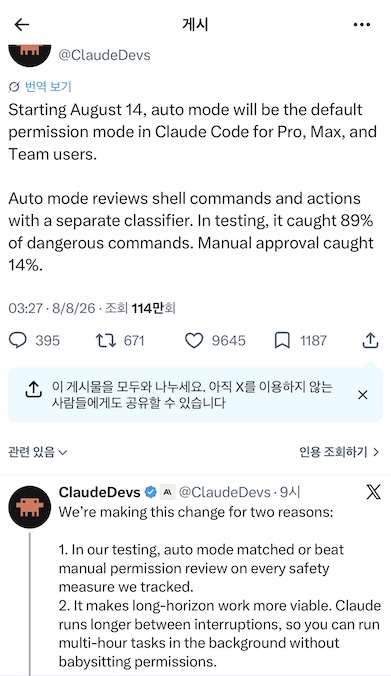
My initial hot take after reading this was to laugh and bemoan the new nondeterministic failure mode. I think Anthropic is trying to do the right thing here. The study they ran was particularly interesting. The LLMs successfully identified dangerous tool calls way more reliably than human operators. While the announcement was sparse on the details, I don't have any reason to doubt the results.
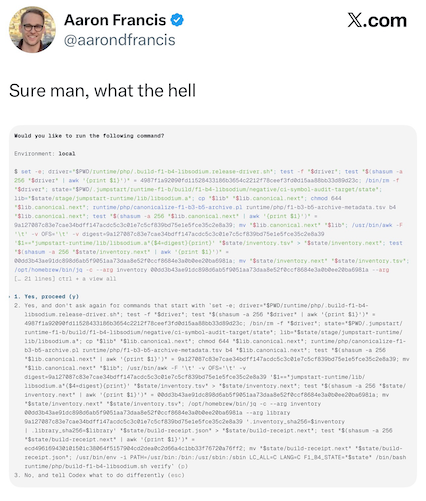
UPDATE 2026-08-30: In case your imagination isn't enough, it's already been proven to be broken4.
Tool call approvals are the wrong layer to make this decision at!
To be useful, a coding agent needs to be able to use tools.
But as their own announcement acknowledges,
asking if a tool call like cargo build safe isn't even the right question!
This can always result in arbitrary code execution.
The worrying part is that clearly the frontier labs are expecting users to run this software on their computers, under their regular user account. They wouldn't be trying to add these safeguards otherwise.
Elements of a good agentic development environment
Rather than resorting to off-the-cuff policy, and hoping the agent won't do something bad, we need to intentionally design the environment so that it's safe for agents or any other untrusted code. Even when they go off the rails5.
Our challenge is to incorporate defense in depth while still making the environment a productive one for development. Every organization's threat model is slightly different, but the following principles can help guide the conversation.
Unique identity with separate access
The first element of a good environment is separate credentials from your personal environment. The agent's environment absolutely must have a separate SSH key, S3 token, and so on, and should never have access to the ones you use.
This is already how things work in the physical world. Employees each get their own badges which only let them enter the areas necessary to do their job. You can't give yours to a friend without a long chat with security (or worse). And when you leave, your unique badge is deactivated.
Warning
Even read-only access can be dangerous! What happens if the agent autonomously runs a pathological query that brings the database to a crawl for everyone else?
Most of the same principles apply here. Though the lifecycle of an agent is less obvious than an employee relationship. We still haven't figured out the best practices here yet.
Short-lived ephemeral credentials are probably the most prudent security posture. Especially given the tendency of vendors to unilaterally change their data retention terms, regardless of what enterprise zero-data retention agreement you may have previously signed.
There is some interesting work regarding using proxies to inject credentials so that the agent never sees them. I expect we'll see more of this sort of thing in the future.
Privilege escalation risk consistent with your threat model
Let's say you've created a separate, unprivileged UNIX user, and use this to run your agents. What happens if finds a local6 privilege7 escalation8 exploit? What if it simply uses Docker to escalate to root?
Recent events have made it clear that agents are quite capable of bypassing defenses, even when they weren't specifically prompted to.
There is certainly a spectrum of tradeoffs in implementation choices here. The most import thing is that you design your environment with a carefully considered threat model in mind, so you know where it can break.
Carefully consider network access and private information exposure
The hardest tradeoffs are around network and data access. Anything that the model is exposed to could theoretically be exfiltrated as long as the agent is capable of network access. How much this matters is a question of organizational risk profile and what you're letting the models access.
Network access is currently the most difficult to manage. It's easy to build an on/off switch around your sandbox, but that's a rather brute force emergency switch.
A better approach would be involve something like a SOCKS proxy. You can disable all regular network access, and approve certain destinations at the boundary. This is an improvement, but I feel like we can probably come up with something better.
You can't always foresee the full range of hosts which you might want the agent to access (unlike the filesystem, which you usually know all required paths upfront). So some level of ad-hoc approvals is necessary. How do we keep this from turning into another tool call approval mess, with policy decided on-the-fly? That's still an open question.
And just as with tool calls, it's tricky to gauge whether a network request is harmless or not. Granting network access to github.com seems reasonable if all of your code is there (my condolences if so). But GitHub access could also download malicious code, or open the door to private data exfiltration9. Even HTTP GET requests aren't necessarily safe.
I think we still have a ways to go in figuring out how to design effective network access policies for agents. The best we can do for now is to carefully control for the other dimensions of the lethal trifecta.
Engineer a Pit of Success
Finally, a good agentic development environment should create a Pit of Success developer experience. It should always be easy to "do the right thing" (and relatively difficult to do the "wrong" thing!). Here are a few examples from my own setup:
Remove temptation to use coding agents from your regular environment
In the ideal case, your regular environment shouldn't even have coding agents installed. You can't accidentally launch it "wrong" if it's not there to launch!
Am I saying you have to uninstall Claude Desktop from your MacBook? Not necessarily. But if you have a dedicated VM or physical box which might reasonably need credentials with more privileged access, you can simply not install the agent in the main environment.
If you really want to use on using a GUI desktop app, containing it is difficult on most OS's. Many of these now support executing against another environment (usually SSH or a cloud VM), but it's up to you to use it responsibly.
You can also delete the code from your main environment if you're able to develop completely "remotely." This way you can keep using the GUI app for chat or other non-agentic tool tasks. (I personally don’t like them though, since they are just bloated browser wrappers that need constant updates.)
(Aside: I put "remotely" in quotes because, as I'll cover in a follow-up, remote development can even happen on the same box.)
One-way mirrors to balance security and ergonomics
You will need to do something eventually with credentials that the agent shouldn't be able to use. One of the easiest ways to do this is with a "one-way mirror" secure environment, where your credentials live outside at the host level, but the agent has a restricted view.
This style of isolation model also lets you trivially observe what the agent is doing from the host environment. You can even attach tools like debuggers from the host. The agent environment can't abuse such tools, and in fact they don't even need to be installed!
FreeBSD Jails, Solaris Zones, and Linux containers make this sort of setup fairly straightforward.
Make it impossible to accidentally do a git commit
My agentic development environment doesn't have an SSH identity with git push privileges, for reasons discussed above. In fact, it doesn't even have a git identity at all. I don't want agents making commits on my behalf anyways (this skips a critical review step for me; I stage every hunk manually even for hand-written code).
But out-of-the-box, git still lets you author commits.
These are assigned a useless username and email based on the UNIX user and host.
To prevent this and save myself future cleanup work,
I run git config --global user.useConfigOnly true in my environment setup.
I can still stage files, which is useful; I just can't make accidental commits.
And with a one-way mirror sandbox design, it's easy for me to jump to the other side, where I do have a git identity, to make the commit.
Depending on your level of paranoia, you may also consider requiring git commit signing, and protect these signing keys behind a password or other security key.
Conclusion
Hopefully this has given you some food for thought. Agent security is something you should be taking seriously. I've deliberately kept most of the implementation details out of this discussion in the interest of brevity, but will cover the current landscape, cutting edge, and tradeoffs of various approaches very soon.
-
Simon Willison's lethal trifecta post ↩
-
Codex bug report (open at the time of this writing) re: unexpected edits in plan mode ↩
-
Claude Code bug report (open at the time of this writing) re: unexpected edits in plan mode ↩
-
Postmortem of an incident where an OpenAI model hacked into HuggingFace to steal a dataset ↩